PLEXON AI
One AI. Every part of the job.
Plexon answers questions, writes documents, and does real work inside WhatsApp, Gmail, Notion and 60 more apps with your own accounts. It runs from your computer, and your data stays on it.
What it does
Four things a chat window does not do.
Plexon keeps what it learned, builds the thing you described, revises its own instructions, and runs more than one job at a time.
Remembers
A knowledge graph you can open and read, built as you work.
Builds
Describe a dashboard, a workflow or a nightly job. It keeps it running.
Improves
Rewrites its own skills as it learns how you work.
In parallel
Agents work side by side, and chats on one project talk to each other.
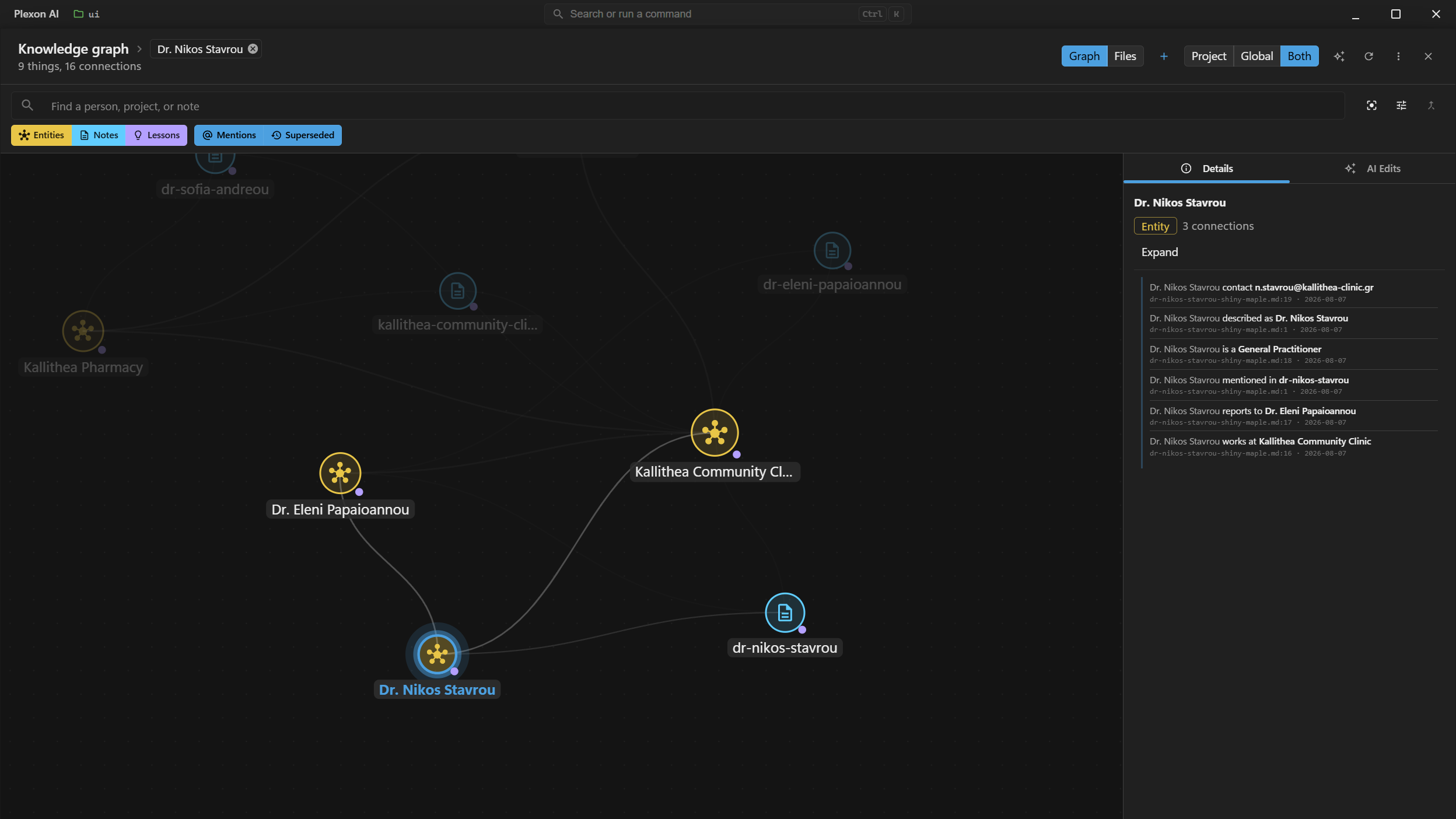
The knowledge graph. Every fact carries the note and the line it was read from.
Personas
12 roles, and the AI changes with them.
A persona is not a preset tone. Switching one swaps in a system prompt written for that role, along with the agents, skills, tools, connectors and boards that role needs, and switching back restores what you had.
Underneath them sit 156 specialised agents across 8 professional domains, 200+ bundled skills and 14 bundled plugins. You can write your own persona in a wizard, with its own instructions.
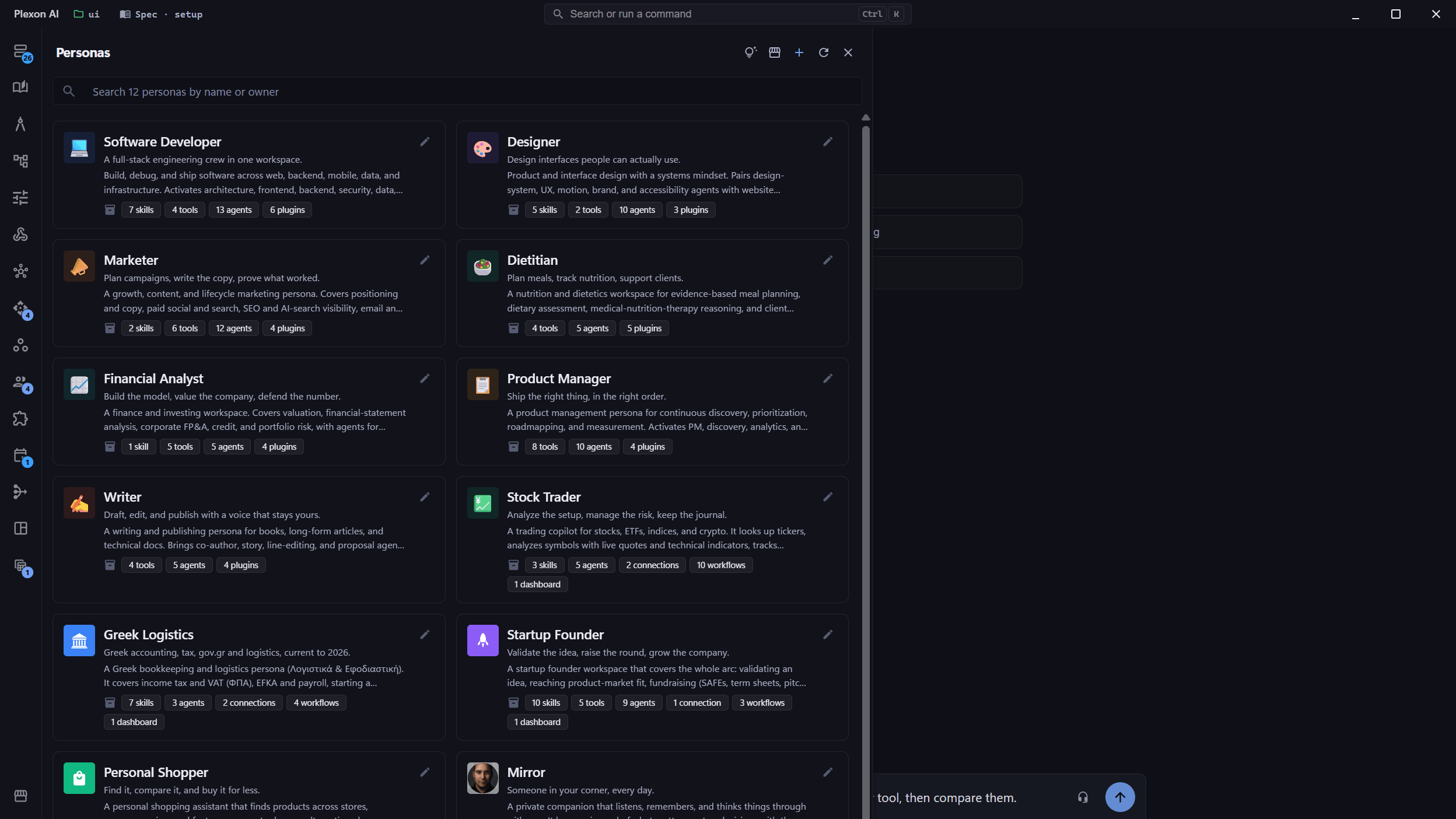
Software Developer
Correctness first, minimal diffs, git safety by default.
Designer
Clarity beats cleverness. Accessibility is not optional.
Marketer
Positioning first, one audience per piece, measure what matters.
Writer
Voice first, show rather than tell, fact-check aggressively.
Product Manager
Problem before solution, outcomes over outputs, write it down.
Financial Analyst
Conservative assumptions, sensitivity over point estimates, show your work.
Stock Trader
Education, never advice. Read-only, and it never places an order.
Dietitian
Evidence over trend, whole-diet patterns, the person before the plan.
Startup Founder
Idea to scale: fundraising, cap tables, go-to-market, the numbers that run it.
Greek Logistics
Greek accounting, tax and logistics, current to 2026, bilingual and dated.
Personal Shopper
Find it across stores, compare, keep a budget, then buy on the store.
Mirror
A private companion that listens and remembers. The journal stays on your machine.
One marketplace
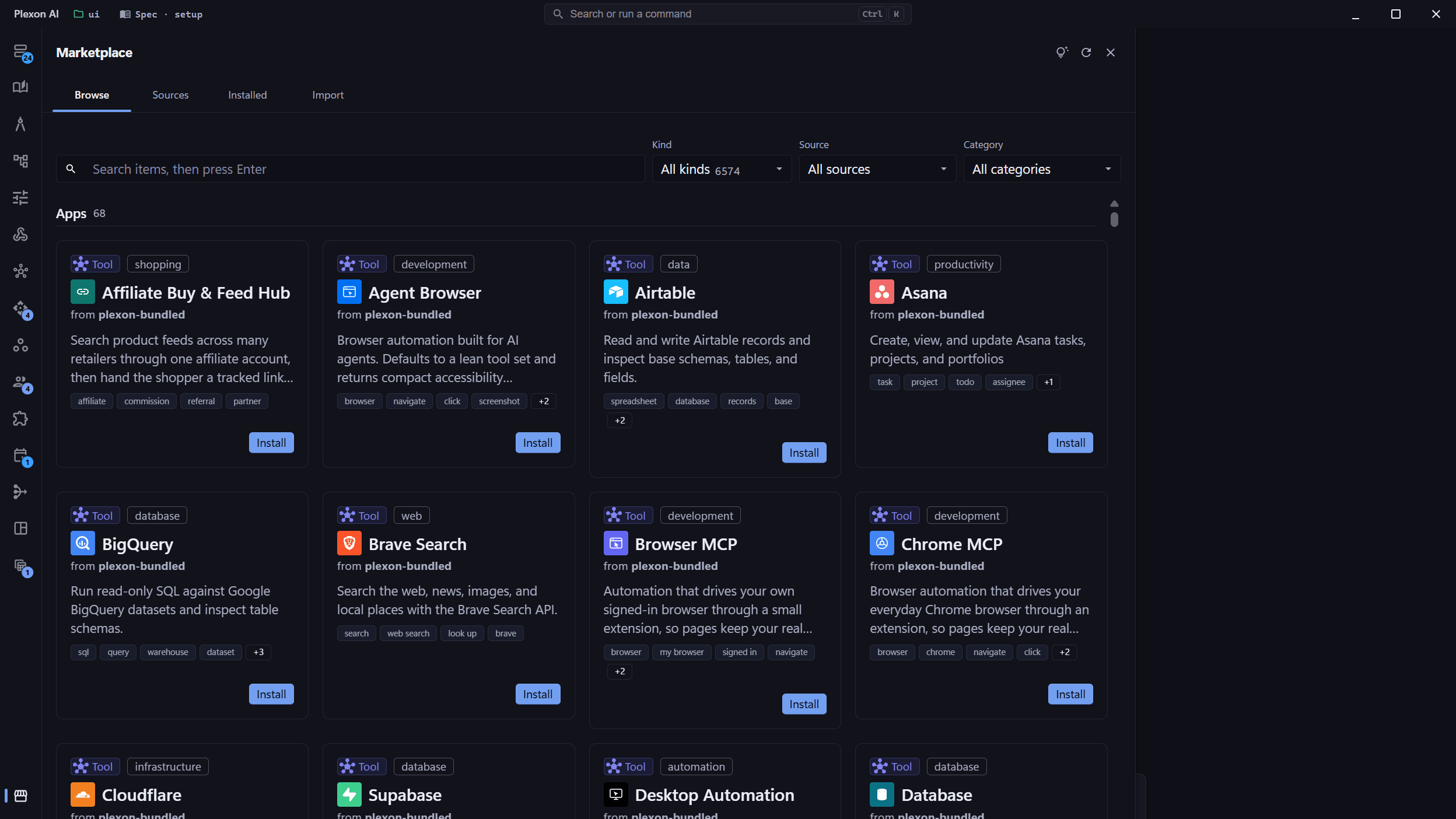
Skills, agents, plugins, personas and MCP servers. In one place.
Most tools give each kind of extension its own registry and its own install ritual. Plexon has one. 7,100+ items come pre-bundled and install in a click.
Install without leaving the app
Browse by kind, source or category. What you install is available to every persona that wants it.
Publish your own
Developer mode walks an eight-step wizard that reads your installed library, fills in item metadata, and bundles, scaffolds or declares each entry.
Collaborate without git
One Sync publishes your edits and pulls everyone else’s. Conflicts resolve per file: keep mine, take theirs, or let the AI merge.
Keep a department in step
Point Plexon at a shared GitHub repository and every installed source updates itself on launch.
Your apps
Signed in as you, running on your machine.
64 app connectors, each connected with your own account. The call goes out from your computer, which is why the answer can come from a thread only you can see rather than from the public web.
Anything else with an API
Import an OpenAPI specification or a Postman collection and every endpoint becomes a tool the assistant can call. Reusable middlewares inject the signed-in identity, so one connection serves a whole team without sharing a credential.
Your own files as a source
Load a spreadsheet or a database once and its columns are available everywhere: in chat, as the rows a workflow loop walks, and as a widget binding with no JSON to write.
Unattended
Work that keeps running after you close the laptop.
The parts that make something happen while you are not there: a board, a flow, a clock, and somewhere to be told about it.
Dashboards
Describe the board and it gets built. Widgets bind to a spreadsheet column, a connector call, or the output of a workflow run, and one parameter at the top changes all of them at once.
Workflows
A flow is steps, loops and conditions. Some steps call the AI and some are plain computation, so a run that only needs arithmetic costs nothing and cannot hallucinate a number.
Schedule
Any sub-agent runs on a cron expression or a simple interval. Results land in one inbox, a run that fails three times in a row disables itself, and your machine notifies you the normal way.
Telegram and Slack
Every session is reachable from your phone. A workflow can post its result to a channel, and a message arriving in one can start the next run.
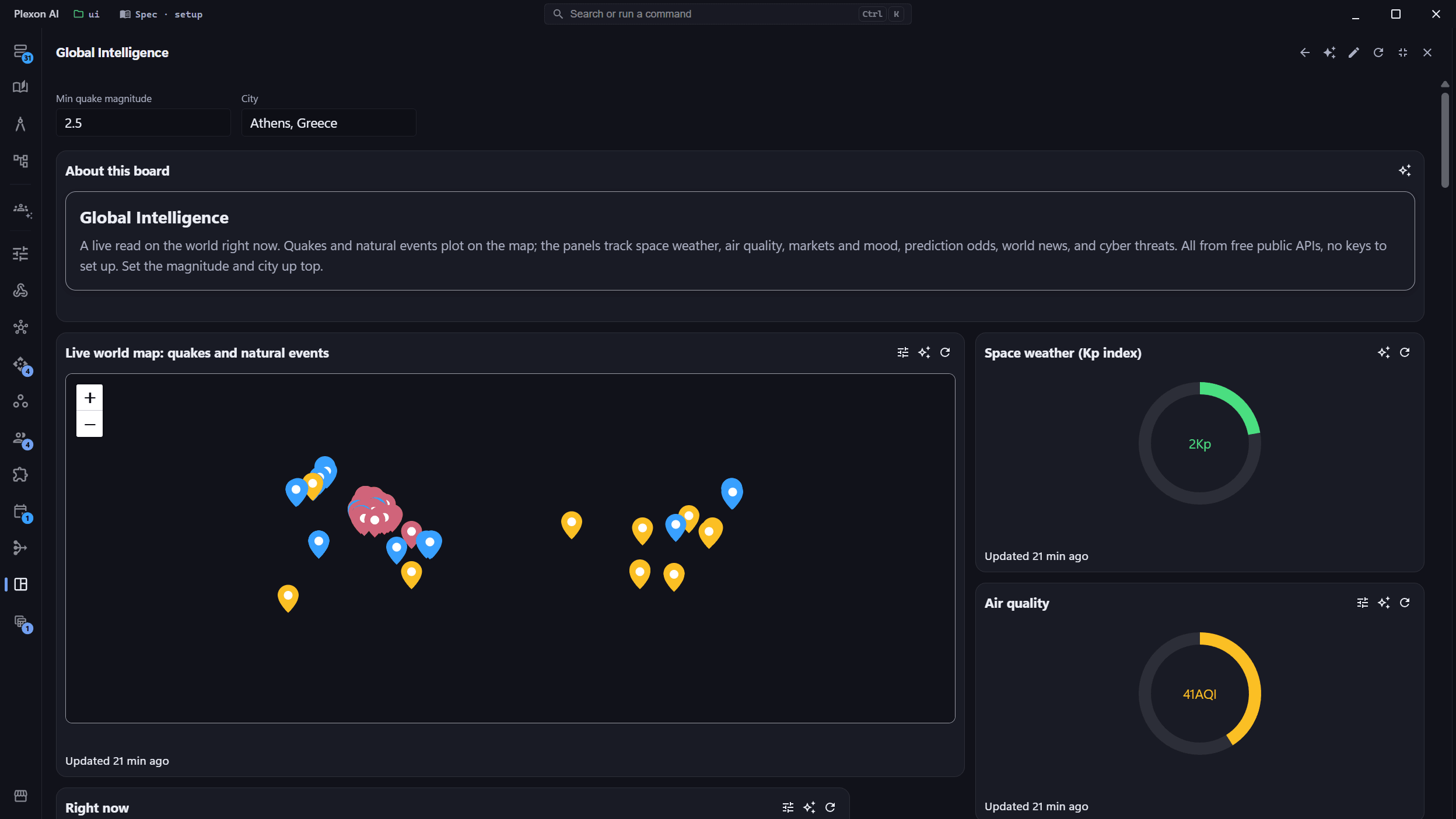
A board built by describing it. The two fields at the top redraw every panel below.
Modes
6 ways to work
The mode sets how much the assistant is allowed to do on its own before it comes back to you.
Change real files, with every diff shown before it lands.
Think it through first. You approve the plan, then the work starts.
A conversation with nothing else attached to it.
Run the task end to end and report back.
Split the job across sub-agents working at the same time.
Turn a rough idea into a written specification somebody else can build from.
Providers
10 to choose from
One is Plexon’s own managed provider, included with a plan. For the rest you bring your own key, so the requests bill to your account and a spending cap you set bounds what any single run can cost.
Or a model you host yourself
The Premium plan takes any OpenAI-compatible or Anthropic-compatible endpoint. That covers a local model through Ollama, LM Studio or vLLM, and a corporate gateway such as Azure OpenAI, with per-model protocol and capability flags.
Architecture
Private because of how it is built.
A promise not to look at your data and an architecture that cannot look at it are different products. Plexon is the second one, and this is what that means in practice.
Local by default
Files, chats, memory and connector credentials live on your disk, encrypted with AES-256-GCM.
A server that holds nothing
The Plexon server is stateless with zero data retention. It cannot hand over what it never had.
Your accounts, your keys
Connectors sign in as you and run from your computer. Bring your own provider key and the billing stays yours.
Live Share, peer to peer
Two apps connect straight to each other, with no Plexon server in between, not even for the handshake.
Session Lock
Lock a chat with a passcode and its messages are encrypted with a key derived from it. Locked chats stay out of exports.
One file to move machines
A whole setup exports to a single encrypted file. The passphrase is yours and is stored nowhere.
Plexon for Business
Ship your own assistant, in your own name.
A company can white-label the app: its brand, its pre-loaded agents, personas and skills, and items clients can use but cannot read or copy. Updates and per-company identity arrive through the official app, so a customer installs Plexon, signs in, and lands in the role you built.
Read about Plexon for BusinessLive example
PNOĒ
The PNOĒ clinic assistant runs on Plexon. It loads a patient’s breath-biomarker report before the appointment, walks the results in order, cites the section behind every number, and drafts the follow-up for a person to send.
See the company pageGetting started
Three steps to a working assistant.
Plexon AI runs on Windows, macOS, and Linux. Full requirements: Windows 10+, macOS 12+, and Linux (Ubuntu 22.04+, Fedora 38+).
Download and sign in
Builds for each platform are published at plexon.ai. The app opens on an empty chat with a model already behind it.
Connect an app
Turn on a connector with your own account, and the assistant starts answering from things that exist only there.
Pick a persona
Switching persona changes the prompt, the tools and the sidebar together. There are 12 to start from, and a wizard for your own.
Pricing is published at plexon.ai/pricing, which is the one place it is kept current.
Your assistant. Your apps. Your machine.
12 personas, 64 connectors and 156 agents, running from your own computer.